On-Demand Recording
On-Demand Recording lets you decide exactly when a live stream is recorded. Instead of recording the whole broadcast, you start and stop recording with REST calls, and each recording session produces its own file.
Use it when you only need specific moments: a key segment of a live event, a compliance-relevant interaction, or a highlight clip.
With Live Recording, every incoming stream is recorded automatically. On-Demand Recording gives you manual control: you decide when recording starts and stops, and you can run several recording sessions on the same stream.
The Builder Hub has a Record on demand tool that starts and stops recordings on your own stream and plays each file back. In the hub, each recording stops after 30 seconds. See Builder Hub: Record on Demand.
How it works
- Start streaming. Set up and start your live stream as usual.
- Start recording. Send a REST call with a filename for the recording.
- Stop recording. Send another REST call. The recording is saved as a file.
- Repeat. Start and stop as many sessions as you need on the same stream. Each session gets its own file.
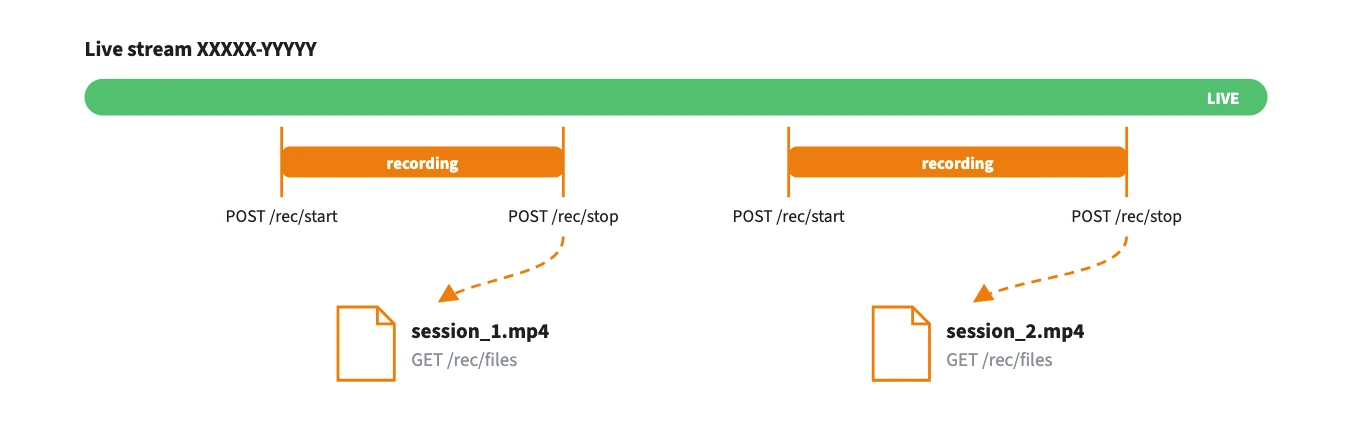
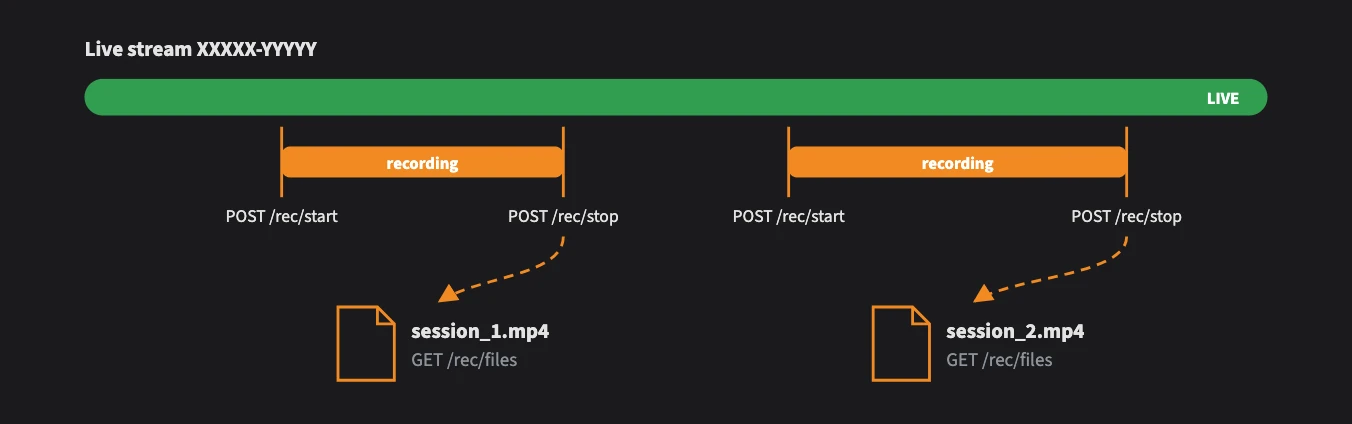
Each start/stop pair is its own session and produces its own file.
Before you start
- A nanoStream Cloud account with a valid bintu token (see Base URL and authentication)
- A live stream that is currently ingesting
- On-Demand Recording enabled for your organisation (see the note at the end of this page)
In the examples below, {stream} is your stream name (for example XXXXX-YYYYY) or its stream ID (UUID).
Step 1: Start your live stream
Start a live stream from the nanoStream Cloud Dashboard or any supported encoder. See Live Encoding. The stream must be live before you start a recording.
Step 2: Start a recording
Send the stream and a filename for the recording session:
curl -X POST https://real-time-api.nanostream.cloud/stream/{stream}/rec/start \
  -H "Authorization: Bearer $BINTU_TOKEN" \
  -H "Content-Type: application/json" \
  -d '{ "filename": "my_recording_001" }'
{ "recordingId": "XXXXX-YYYYY-rec-my_recording_001" }
Use letters, digits and underscores only, 1–64 characters, with no - and no file extension. For example, round_1042 is valid, but round-1042.mp4 is rejected with a 400 error.
Step 3: Stop the recording
Stop the session with the same filename you started it with:
curl -X POST https://real-time-api.nanostream.cloud/stream/{stream}/rec/stop \
  -H "Authorization: Bearer $BINTU_TOKEN" \
  -H "Content-Type: application/json" \
  -d '{ "filename": "my_recording_001" }'
{ "streamname": "XXXXX-YYYYY", "filename": "my_recording_001", "stopped": true }
Stopping is safe to repeat. If the session was already stopped, stopped is false and nothing changes.
Step 4: Check active recordings (optional)
See which recording sessions are running on a stream:
curl https://real-time-api.nanostream.cloud/stream/{stream}/rec \
  -H "Authorization: Bearer $BINTU_TOKEN"
{ "streamname": "XXXXX-YYYYY", "recordings": [{ "filename": "my_recording_001" }] }
Step 5: Get your recorded files
List the finished recordings for a stream, with a download URL for each file:
curl https://real-time-api.nanostream.cloud/stream/{stream}/rec/files \
  -H "Authorization: Bearer $BINTU_TOKEN"
{
  "streamname": "XXXXX-YYYYY",
  "files": [
    {
      "name": "my_recording_001.mp4",
      "url": "https://bintu-vod.nanocosmos.de/vod/rec/my_recording_001.mp4",
      "size": "12345678",
      "createdAt": "2026-10-20T10:30:00Z"
    }
  ]
}
Files usually appear within about a minute after a recording stops. size and createdAt can be null until the file is ready. The list also includes files from automatic Live Recording, newest first.
Endpoints
| Method | Path | Body | Purpose |
|---|---|---|---|
POST | /stream/{stream}/rec/start | { "filename": "…" } | Start a recording session |
POST | /stream/{stream}/rec/stop | { "filename": "…" } | Stop a recording session |
GET | /stream/{stream}/rec | List active recording sessions | |
GET | /stream/{stream}/rec/files | List finished recordings with download URLs |
| Status | Meaning |
|---|---|
400 | Missing or invalid input, for example a filename with - |
401 | Missing or invalid bintu token |
403 | The stream doesn't belong to your organisation |
404 | The stream wasn't found |
502 / 504 | An upstream service returned an error or couldn't be reached. Try again. |
For full schemas, see the interactive Real-Time API Reference.
On-Demand Recording requires a business upgrade. Contact our sales team through the contact form or by email to sales(at)nanocosmos.de.