Multi-Camera Switching: API Reference
Multi-camera switching uses three endpoints of the nanoStream Real-Time API. For a walkthrough, see Multi-Camera Switching.
Base URL: https://real-time-api.nanostream.cloud
| Method | Path | Called by | Purpose |
|---|---|---|---|
POST | /rooms/setup | Your backend | Set up a stream group and get the player URL |
PUT | /rooms/{roomId}/switch | Your backend | Change the angle that's on air |
GET | /rooms/{roomId}/events | The player | Receive switch events (server-sent events) |
All requests and responses use JSON, and all calls must use HTTPS.
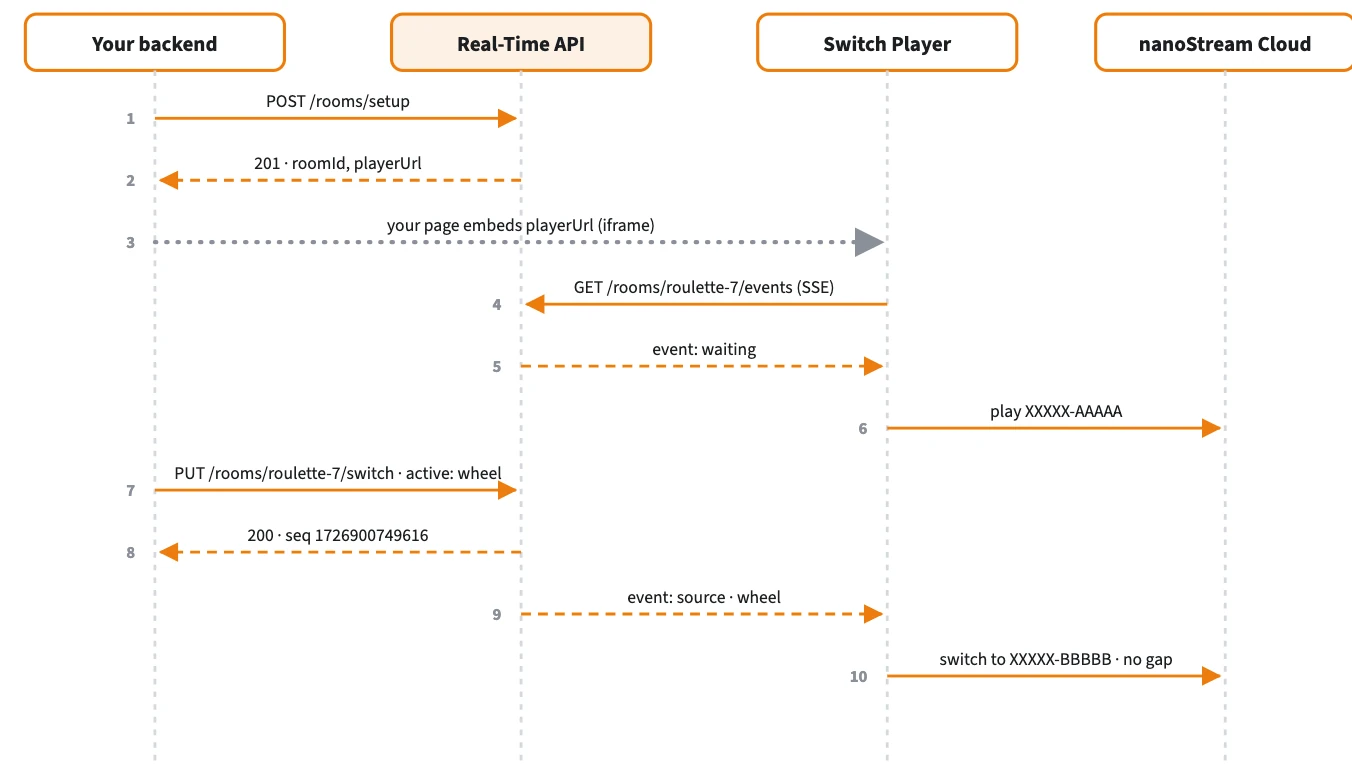
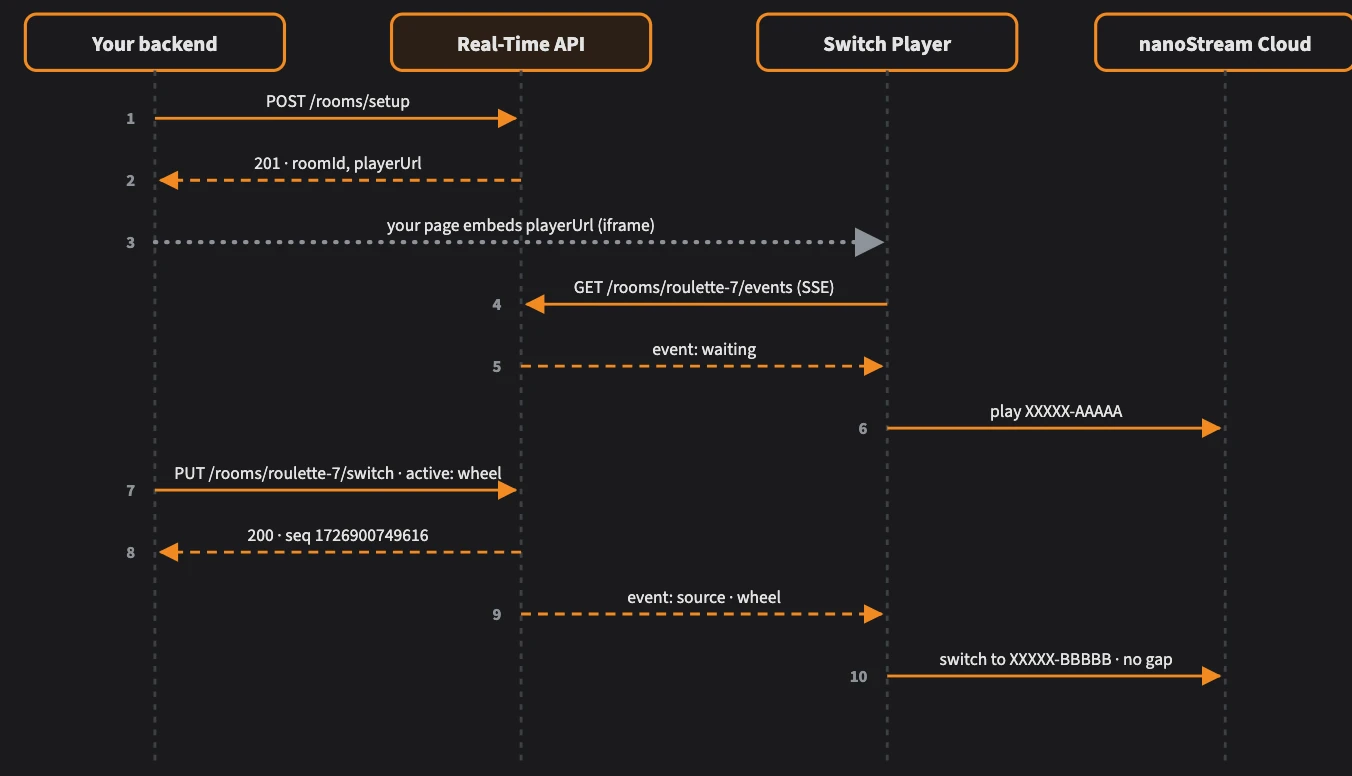
Solid arrows are requests, dashed arrows are responses and events.
Authentication
/rooms/setup and /rooms/{roomId}/switch need a bintu token (a JWT) in one of these headers:
Authorization: Bearer <bintu token>
X-BINTU-TOKEN: <bintu token>
This is the same bintu token you use with the other nanoStream Cloud APIs. You can get one from the nanoStream Cloud Dashboard or the bintu API, or create one from your API key with the Cloud Token Service.
The switching endpoints also accept your bintu API key directly, in an X-BINTU-APIKEY header.
/rooms/{roomId}/events doesn't use your bintu token. It uses the signed player token that /rooms/setup puts in the player URL. This token can only read switch events for that one group, so it's safe to give to viewers.
POST /rooms/setup
Sets up a stream group (room) and returns a ready-to-embed player URL. Call it once per group, for example when a table opens. Each stream is checked against your account.
Request body
| Field | Type | Required | Description |
|---|---|---|---|
roomId | string | No | Your name for the group, for example roulette-7. If you leave it out, one is generated from your organisation and the default angle's label, so set your own roomId when you run more than one group. |
streams | array | Yes | 1–10 camera angles. Exactly one must have active: true. |
streams[].label | string | Yes | Your name for the angle, for example wide. Must be unique within the group. Labels are compared case-insensitively. Used in switch calls. |
streams[].stream | string | Yes | Stream name (XXXXX-YYYYY) or stream ID (UUID) |
streams[].active | boolean | No | true for the angle viewers see first. Default false. |
security.jwtoken | string | No | Playback token for organisations with Secure Playback. Built into the player URL. |
{
  "roomId": "roulette-7",
  "streams": [
    { "label": "wide",   "stream": "XXXXX-AAAAA", "active": true },
    { "label": "wheel",  "stream": "XXXXX-BBBBB" },
    { "label": "dealer", "stream": "XXXXX-CCCCC" }
  ]
}
Response 201 Created
| Field | Type | Description |
|---|---|---|
roomId | string | The group ID. Use it in switch calls. |
playerUrl | string | The URL to embed in an iframe |
streams[] | array | Each angle with its label, streamId (UUID), streamName and active flag |
Errors
| Status | Meaning |
|---|---|
400 | Missing or invalid input, for example no active angle, or more than one |
401 | Missing or invalid bintu token |
403 | A stream doesn't belong to your organisation |
404 | A stream wasn't found in your account |
502 | An upstream service returned an error. Try again. |
504 | An upstream service couldn't be reached. Try again. |
PUT /rooms/{roomId}/switch
Changes the angle that's on air. All connected players switch to it.
Path parameters
| Parameter | Description |
|---|---|
roomId | The group ID from /rooms/setup |
Request body
| Field | Type | Required | Description |
|---|---|---|---|
active | string | Yes | Label of the angle to put on air. Must be a key in angles. |
angles | object | Yes | The full set of angles as label: streamName. Send it with every switch call. |
{
  "active": "wheel",
  "angles": {
    "wide":   "XXXXX-AAAAA",
    "wheel":  "XXXXX-BBBBB",
    "dealer": "XXXXX-CCCCC"
  }
}
Response 200 OK
| Field | Type | Description |
|---|---|---|
ok | boolean | true when the switch was sent to the players |
roomId | string | The group ID |
active | string | The angle now on air |
seq | integer | Sequence number (a timestamp in milliseconds). Players use it to ignore out-of-date events. |
{ "ok": true, "roomId": "roulette-7", "active": "wheel", "seq": 1726900749616 }
Errors
| Status | Meaning |
|---|---|
400 | Missing or invalid input, for example active isn't in angles |
401 | Missing or invalid bintu token |
502 | An upstream service returned an error. Try again. |
504 | An upstream service couldn't be reached. Try again. |
GET /rooms/{roomId}/events
A server-sent events stream that tells the player which angle is on air. The hosted Switch Player opens it automatically.
GET /rooms/roulette-7/events?token=<player token>
| Parameter | In | Description |
|---|---|---|
roomId | path | The group ID |
token | query | The signed player token from the playerUrl |
Events
| Event | When | Data |
|---|---|---|
source | On connect (if an angle has been switched to) and on every switch | roomId, active label, seq, and source.streamname |
waiting | On connect, if no switch has happened yet | roomId |
: ping | Every 20 seconds | Keep-alive comment, no data |
event: source
data: {"roomId":"roulette-7","active":"wheel","seq":1726900749616,"source":{"streamname":"XXXXX-BBBBB"}}


A source event arrives on connect if an angle is already on air, and again on every switch.
Viewers never receive the full list of angles.
Player URL parameters
The playerUrl from /rooms/setup already contains everything the player needs. You can append this optional parameter:
| Parameter | Description |
|---|---|
group.security.jwtoken | Playback token for secure playback, if you didn't pass one to /rooms/setup |
Defaults: autoplay on, starts muted (automute), fast start on, latencyControlMode=balancedadaptive.
Error format
All errors use the same JSON shape:
{
  "error": {
    "code": "bad_request",
    "message": "exactly one stream must be active"
  }
}
code | Status |
|---|---|
bad_request | 400 |
unauthenticated | 401 |
forbidden | 403 |
stream_not_found | 404 |
internal_error | 500 |
bintu_error | 502 |
vtrans_error | 502 |
upstream_unavailable | 504 |
Interactive reference
The full OpenAPI reference, where you can try every call, is at real-time-api.nanostream.cloud/docs.
The Stream Switching demo also shows every call for your own group. How it works & API lists the player link, ingest details and ready-made requests, and the Event log records each request and event as it happens.
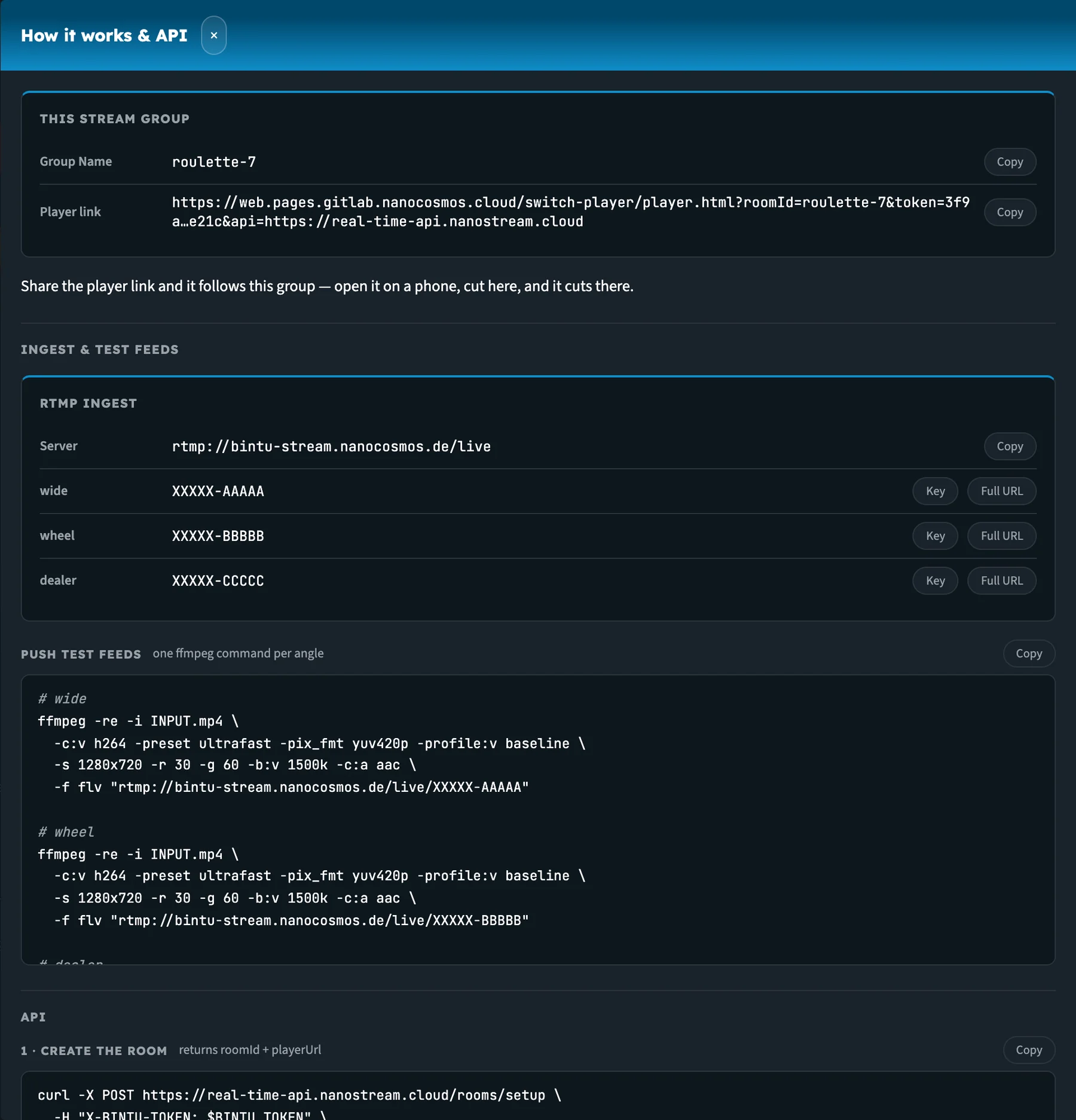
The How it works & API drawer, filled in for the group roulette-7.
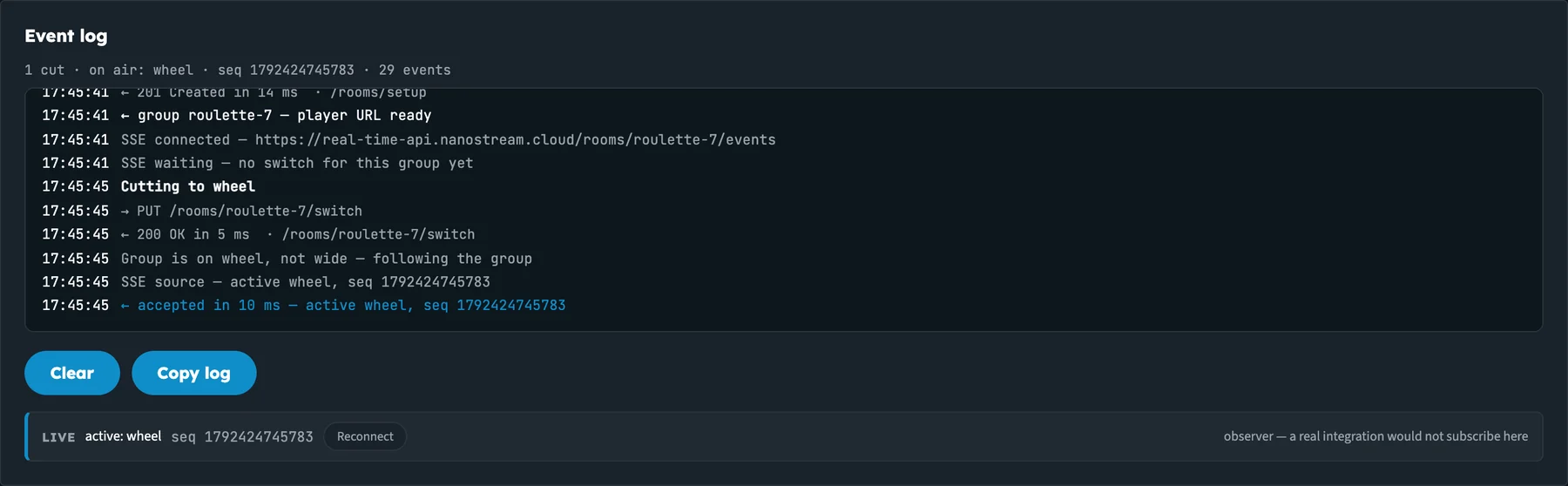
The event log for one cut: PUT /switch, its 200 response, and the source event the players received.