nanoStudio Overview
nanoStudio is the set of real-time production tools that works on top of nanoStream Cloud. It changes what your viewers see without extra hardware or software on set. The work happens in the cloud pipeline, and the result is delivered with the same ultra-low latency as every nanoStream live stream.
nanoStudio uses your existing nanoStream account. You sign in with the same API key or Dashboard login, and your streams, ingest URLs and players stay the same.
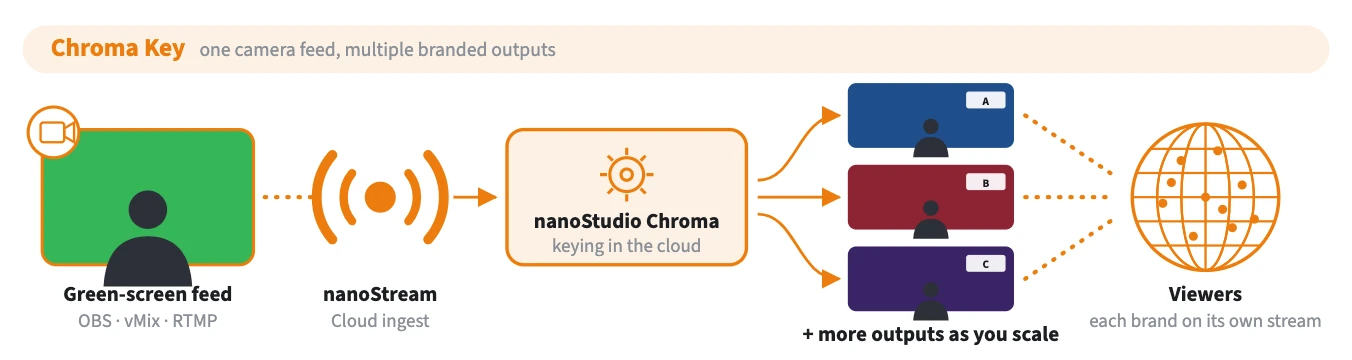
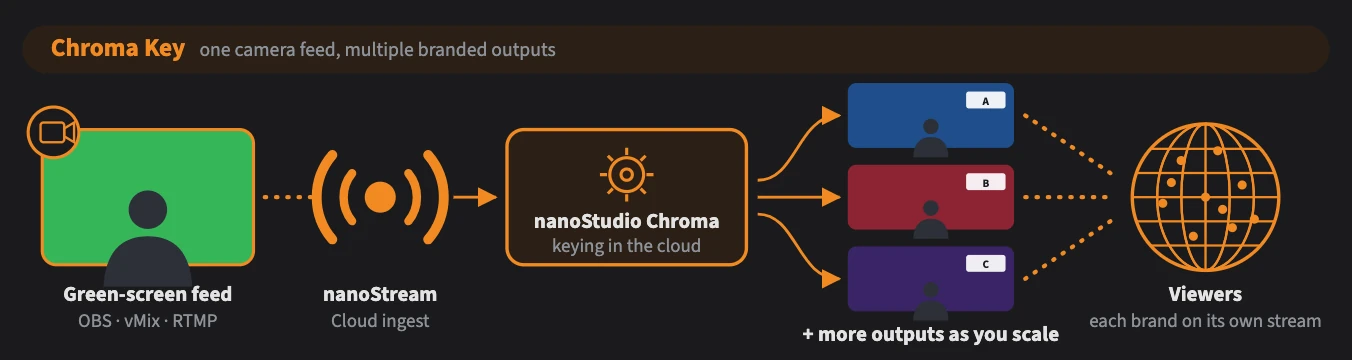
One camera feed in, multiple branded outputs out.
Create a free account in the nanoStream Cloud Dashboard, then follow Getting Started to send your first live stream. Every nanoStudio tool starts from a running stream.
Chroma Key
Replace a green or blue screen with any background in the cloud, live. One camera feed, multiple outputs, and you can keep adding outputs as you scale. Each output has its own background, logo overlay, tags and adaptive bitrate (ABR) ladder, so one presenter can appear in several branded studios at the same time.
- Keying runs server-side in the nanoStream pipeline, so viewers need no extra processing
- Browser-based setup and tuning tool with Autotune
- Per-output backgrounds (MP4, PNG, JPG or another live stream) and PNG overlays
- Tune the key, despill, EQ and overlay position in real time while you're live
- Change backgrounds, overlays and tags on a running stream
Get started: Chroma Key: Getting Started
These are part of the nanoStream Real-Time API. See Multi-Camera Switching and On-Demand Recording.
How to get access
nanoStudio features are enabled per organisation. To enable Chroma Key on your account, contact our sales team through the contact form or by email to sales(at)nanocosmos.de.
Resources
- Chroma Setup Tuner: set up and tune chroma key
- Builder Hub: Chroma Key and Branded Outputs: set up chroma key and watch every branded output in the Builder Hub
- nanoStream Real-Time API: on-demand recording and multi-camera switching
- bintu API: create and manage streams programmatically
- Support