Token Best Practices & Backend Integration
How you create and manage playback tokens has a direct impact on your security posture. This guide covers the recommended token workflow, best practices for token configuration, and a complete backend integration example.
For the full JWT API specification (endpoints, parameters, response codes), see Creating JSON Web Token for Secure Playback via API. For creating tokens via the Dashboard UI, see the Dashboard Secure Playback Guide.
Required Permissions
Playback tokens can be created by the following roles:
| nanoAdmin | nanoUser | nanoReadOnly |
|---|---|---|
| ✓ | ✓ | ✗ |
To find your API key or create a Bintu token, sign in to your nanoStream Cloud/bintu account and navigate to the organization overview at dashboard.nanostream.cloud/organisation.
Token Workflow Overview
The recommended architecture keeps your credentials on the backend and issues short-lived, context-aware tokens to each viewer:
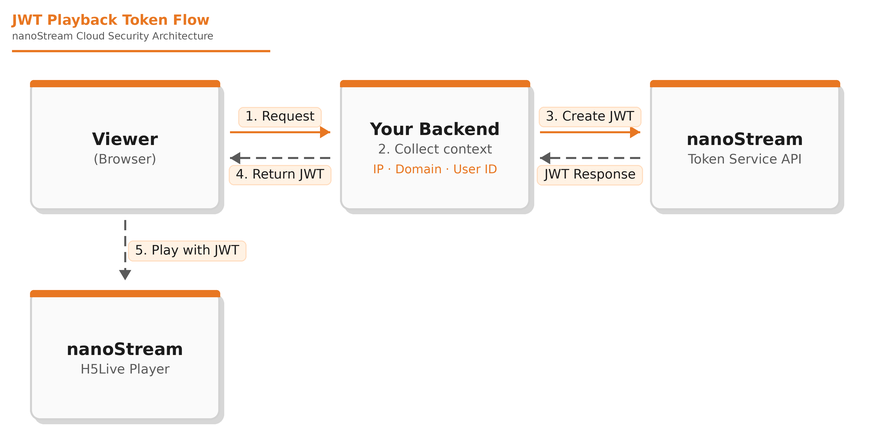
Step by step:
- The viewer's browser requests playback from your backend.
- Your backend collects context from the request: the viewer's IP, the referring domain (via
Origin/Referer), and any user identity from your authentication system. The extraction of the viewer's IP depends on your backend. The remote address if clients are connecting directly or values extracted fromX-Real-IP/X-Forwarded-Forheaders if running behind a gateway or load balancer. - Your backend calls the nanoStream Token Service API to create a short-lived JWT with the appropriate restrictions.
- The JWT is returned to the browser.
- The H5Live Player uses the JWT for playback. nanoStream Cloud validates the token and only allows playback if all restrictions are met.
Best Practices
Keep tokens short-lived
Set expiration times between 5 minutes and 24 hours depending on your use case. Shorter tokens reduce the window of opportunity for misuse. The default expiration is 2 weeks for non-revocable tokens and 24 hours for revocable tokens, but for production systems a much shorter duration is recommended.
Restrict every token as tightly as possible
For each token, apply as many restrictions as your use case allows:
- Stream scope: Limit to a single stream or stream group rather than organization-wide.
- Domain: Bind to your playback domain to prevent embedding on unauthorized sites.
- IP: Bind to the viewer's IP address to prevent token sharing.
- User ID: Include a user identifier so that if a token is compromised, you can trace it back to a specific user or session.
Protect your credentials
For backend authentication with the nanoStream APIs, use a Bintu token (X-BINTU-TOKEN) rather than the organization API key whenever possible. Bintu tokens are temporary, session-based, and scoped to the user's role — limiting the impact if a credential is compromised. They can also be manually invalidated at any time.
The organization API key (X-BINTU-APIKEY) is permanent and grants the highest level of access. If you do use it, store it exclusively on your backend server. Never embed either credential in client-side JavaScript, mobile apps, or any code that could be inspected by end users. Your backend should be the only component that communicates with the Token Service API.
Validate request origin
Before issuing a token, validate the request:
- Check
Origin/Refererheaders to ensure requests come from your allowed domains. - Configure CORS on your backend to reject requests from unknown origins.
- Require user authentication (login, session token) before issuing playback tokens.
Tag tokens for traceability
Use the user and tag fields to make tokens traceable. If misuse occurs, these fields allow you to identify which user or session was involved, enabling targeted response without disrupting other viewers.
Use revocable tokens for high-value content
For premium live events, ticketed streams, or any scenario where rapid response to misuse is critical, create tokens with "revocable": true. This allows you to immediately invalidate a compromised token. See Token Revocation for details.
IPv4 / IPv6 Considerations
All nanoStream Cloud streaming systems operate over IPv4. If a viewer connects via IPv6, the connection is automatically translated to IPv4 via NAT64. This means secure tokens use IPv4 addresses for IP restrictions.
To restrict IPv6 clients, obtain their public IPv4 address (e.g., via https://api.ipify.org) and use that address in the token.
Backend Integration Example
The following example shows a Node.js/Express backend that creates context-aware, short-lived JWTs:
// server.js
import express from 'express';

const app = express();
app.use(express.json());

function getClientIp(req) {
  const xfwd = req.headers['x-forwarded-for'];
  if (xfwd) return xfwd.split(',')[0].trim();
  return req.socket?.remoteAddress || null;
}

function getClientDomain(req) {
  const ref = req.headers.referer || req.headers.origin;
  try {
    return ref ? new URL(ref).hostname : (req.headers.host?.split(':')[0] || null);
  } catch {
    return null;
  }
}

app.post('/playback-token', async (req, res) => {
  const { groupId } = req.body;
  if (!groupId) return res.status(400).json({ error: 'groupId is required' });

  const clientIp = getClientIp(req);
  const clientDomain = getClientDomain(req);

  const payload = {
    groupid: groupId,
    exp: Math.floor(Date.now() / 1000) + 60 * 30,  // 30 min
    ip: clientIp || undefined,
    domain: clientDomain || undefined
  };

  try {
    const resp = await fetch('https://token.nanostream.cloud/api/v1/splay', {
      method: 'POST',
      headers: {
        'content-type': 'application/json',
        'x-bintu-token': process.env.BINTU_TOKEN
      },
      body: JSON.stringify(payload)
    });

    if (!resp.ok) return res.status(resp.status).json({ error: await resp.text() });
    const data = await resp.json();
    const jwtoken = data?.data?.token || null;

    if (!jwtoken) return res.status(500).json({ error: 'No JWT in response' });
    return res.json({ jwtoken });
  } catch (err) {
    return res.status(500).json({ error: err.message });
  }
});

// Listen on IPv4 only
app.listen(3000, '0.0.0.0', () => console.log('Token endpoint running on :3000'));
The corresponding frontend:
<div id="playerDiv" style="width:100%; max-width:800px; aspect-ratio:16/9;"></div>
<script src="https://demo.nanocosmos.de/nanoplayer/api/release/nanoplayer.5.min.js"></script>
<script>
async function start() {
  const groupId = 'xxxxxxxx-zzzz-yyy-aaaa-aaabbbcccddd';

  // Request a short-lived JWT from your backend
  const res = await fetch('/playback-token', {
    method: 'POST',
    headers: { 'content-type': 'application/json' },
    body: JSON.stringify({ groupId })
  });
  const { jwtoken } = await res.json();

  const player = new NanoPlayer('playerDiv');
  player.setup({
    source: {
      group: {
        id: groupId,
        security: { jwtoken },
        startQuality: 'medium'
      }
    }
  });
}
start();
</script>