Bintu Custom Webhooks
Custom webhooks in Bintu allow you to integrate your own backend logic directly into the ingest workflow of nanoStream Cloud.
Instead of using fixed access rules, you can forward every publish attempt to a configurable API endpoint for validation. This endpoint can decide, at runtime, whether a stream is allowed to be published.
This mechanism enables advanced use cases such as:
- custom authentication and authorization
- per-stream access control
- event-driven backend integration
- logging and auditing of publish events
- enforcing business rules before a stream goes live
Bintu webhooks are synchronous and blocking: Bintu will wait for your server's response. If your server responds with 200 OK, the action proceeds. If it responds with 403, the action is rejected.
This makes webhooks a powerful and flexible control point in your streaming pipeline.
Prerequisites
To use custom webhooks, you need
- An active nanoStream Cloud/Bintu account (trial or paid).
- Administrative access to your organization in the Dashboard
- An API key (Find here: dashboard.nanostream.cloud/organisation)
- A publicly reachable HTTPS endpoint for receiving webhook requests
- Create an account via Sign Up
- Follow the Getting Started Guide
- Or for account upgrades to help with implementations or hosting reach out to our sales team via the contact form or sales(at)nanocosmos.de
How Bintu Webhooks Work
Webhooks are server-to-server callbacks that notify your backend when certain events occur in Bintu. Using custom webhooks is the recommended way to protect your ingest workflow with custom authentication logic.
Event Types
| Event | Description |
|---|---|
| on_publish | A broadcaster attempts to start ingest |
| on_publish_update | Periodic ingest status update |
| on_publish_done | Ingest ended |
For playback-level protection, please check out nanoPlayer Token Security.
Request and Response Logic
For every such event, Bintu sends an HTTP POST request to your custom webhook endpoint:
- Header:
Content-Type: application/x-www-form-urlencoded - Body: URL-encoded event metadata
Your server must always return a valid HTTP response:
| HTTP response | Description |
|---|---|
200 OK | Allow publish |
403 Forbidden | Deny publish |
| any other status | Request is rejected |
Because the call is blocking, slow response times will slow down stream start times. Ensure your service responds quickly (< 100–300 ms recommended).
Configure Your Custom Webhook
Setting up a custom webhook is very straightforward. You can do this via the dashboard or via the REST API.
It is possible to set it up with the following roles:
| nanoAdmin | nanoUser | nanoReadOnly |
|---|---|---|
| ✓ | - | - |
Dashboard
If you open the organisation overview page in the dashboard using dashboard.nanostream.cloud/organisation/overview, you can easily set the custom webhook there by clicking on the edit icon at the end of the text field. This will allow you to set/edit the value or delete it, if you are authorised to do so.
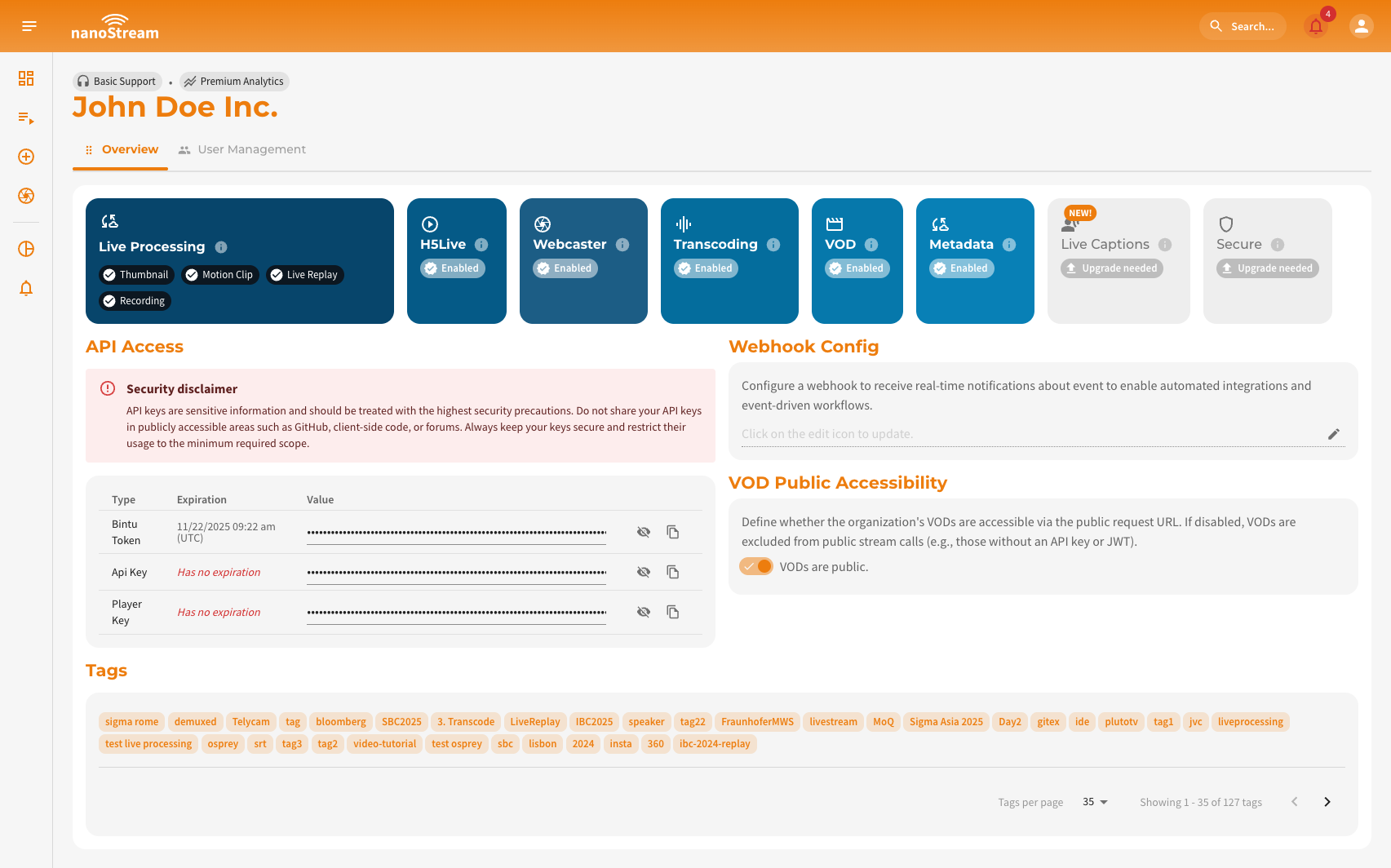 Screenshot: Organization Overview
REST API
You can configure your organization's webhook URL using the following API request.
API Reference
doc.pages.nanocosmos.de/bintuapi-docs/#operation/Set%20Webhook
Parameters
X-BINTU-APIKEY: Your API key for authentication
Body
WEBHOOK: A publicly reachable HTTPS endpoint for receiving webhook requests
cURL
curl -X PUT \
  https://bintu.nanocosmos.de/organisation/webhook \
  -H 'content-type: application/json' \
  -H 'x-bintu-apikey: YOUR_BINTU_API_KEY' \
  -d '{
    "webhook": "https://your-custom-server.com/hook"
}'
Webhook Request Parameters
Below are the unified parameters followed by per-event parameter tables.
Common Parameters (All Events)
| Parameter | Description | Example |
|---|---|---|
| call | Webhook event type | publish, update_publish, publish_done |
| name | Bintu streamname | 'XXXXX-YYYYY' |
| app | Application | e.g. live |
| addr | Client IP address | xxx.yyy.zzz.aaa |
| clientid | Internal client identifier | 123456 |
Additional parameters depend on the specific event.
on_publish
| Parameter | Description |
|---|---|
| call | publish |
| name | Stream name |
| app | Publishing application (typically live) |
| addr | Client IP address |
| clientid | Unique client session ID |
on_publish_done
| Parameter | Description |
|---|---|
| call | publish_done |
| name | Stream name |
| app | Publishing application |
| addr | Client IP |
| clientid | Client session ID |
| bytes_in | Total bytes received from encoder |
| bytes_out | Total bytes distributed to CDN/clients |
As stated above, the request body also contains the keys bytes_in and bytes_out. The unit of the values is byte.
on_publish_update
| Parameter | Description |
|---|---|
| call | update_publish |
| time | Seconds elapsed since the publish started |
| timestamp | Timestamp of the latest audio/video packet |
| name | Stream name |
| app | Application |
| addr | Client IP |
| clientid | Client ID |
Custom Data With Query Parameters
You can append your own custom parameters to the stream name when publishing a stream. These custom fields are included in the webhook POST body exactly as they appear in the URL. Bintu will not modify or interpret your parameters. They are simply forwarded to the configured webhook endpoint. You can add n parameters*.
Custom publish parameters
Generally publish parameters are appended to the streamname, NOT the stream URL.
- Broadcasters that require separate configuration of stream URL and stream name
Example:
- RTMP URL:
rtmp://bintu-vtrans.nanocosmos.de/live - Stream name:
XXXXX-YYYYY?passcode=your_passcode
- Broadcasters that require combined configuration of stream URL and stream name
Example:
- RTMP URL and stream name:
rtmp://bintu-vtrans.nanocosmos.de/live/XXXXX-YYYYY?passcode=your_passcode
-
Broadcasters using WHIP ingest or the Webcaster SDK
The arguments must be URL-encoded, see Custom Publish Parameters.
-
Bintu sends on_publish the following POST body to your webhook:
passcode=your_passcode&call=publish&name=XXXXX-YYYYY&app=live&addr=xxx.xxx.xxx.xxx&clientid=123456